Deposit and Withdraw on Y888 Game is straightforward, leveraging Pakistan’s popular mobile wallets like EasyPaisa and JazzCash for quick transactions. Users can fund their accounts instantly via online deposits with bonuses, while withdrawals process in 5-30 minutes up to Rs. 500 per transaction. This system ensures secure, fair play with RNG algorithms, allowing seamless real-cash gaming on slots, cards, and live tables.
How to Deposit on the Y888 Game Account
Log in to your Y888 account and navigate to the “Deposit” section from the main menu.
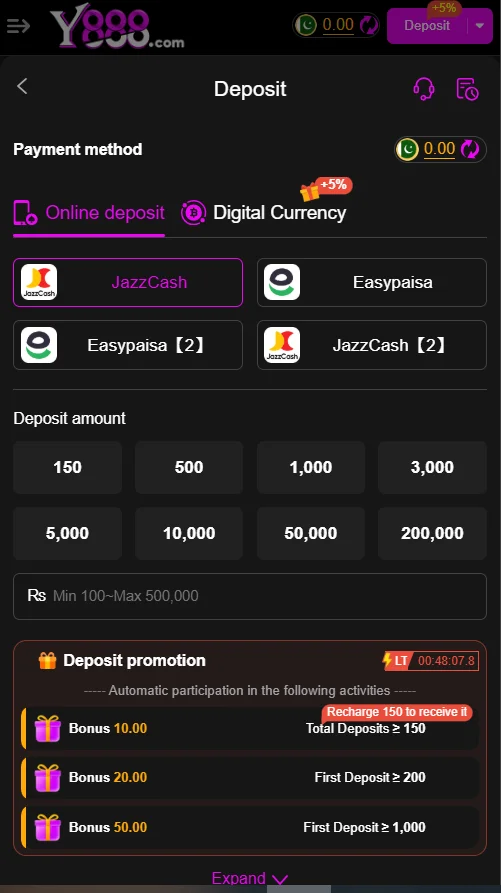
Select “Online Deposit” as the payment method, then choose EasyPaisa or JazzCash from the available options.
Enter the deposit amount, starting from the minimum of Rs. 100, and confirm the transaction details.
Follow the prompt to complete payment via your EasyPaisa or JazzCash app, approving the transfer securely.
Once processed instantly, check your balance for the added funds and any applicable deposit bonuses.
Review promotion details, like 5% extra on digital currency or tiered bonuses for first deposits over Rs. 200.
Start playing games such as Teen Patti or slots with your newly funded account.
Monitor transaction history in the app to ensure everything reflects correctly.
How to Withdraw Your Winnings from Y888 Game
Ensure your account is verified and you meet the minimum withdrawal limit of Rs. 500 in available balance.
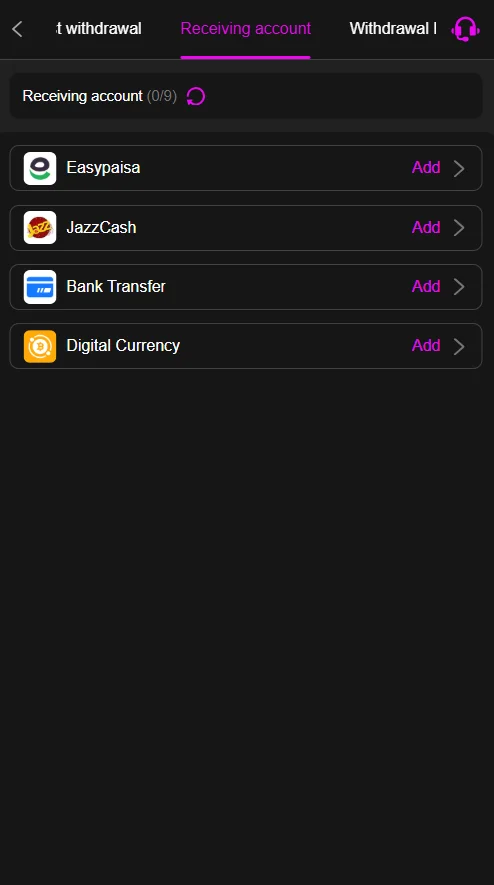
Go to the “Withdrawal” tab and select “Receiving Account” to view or add your EasyPaisa, JazzCash, or bank details.
Choose the withdrawal method, such as EasyPaisa or JazzCash, and enter the amount to withdraw.
Confirm the details, including any required OTP from your mobile wallet for security.
Submit the request; processing typically takes 5-30 minutes on weekdays.
Track the status in your transaction history and receive funds directly in your chosen account.
Troubleshooting Common Issues
Deposit Issues:
If the deposit doesn’t reflect, verify the payment was approved in your EasyPaisa or JazzCash app and wait up to 5 minutes before retrying.
Check for network issues; switch to a stable Wi-Fi connection and ensure your wallet has sufficient balance above Rs. 100.
Clear app cache or restart the Y888 app if the payment prompt fails to load properly.
Contact Y888 support via in-app chat if bonuses aren’t applied after successful deposit.
Confirm your account isn’t restricted due to incomplete KYC; upload CNIC if prompted.
Withdrawal Issues:
If withdrawal is pending beyond 30 minutes, check for pending verifications like OTP or recent deposit requirements.
Ensure the receiving account matches your registered mobile number to avoid rejection errors.
Resolve “insufficient balance” by confirming winnings are cleared from any active bets or bonuses.
Update your wallet app if transaction fails due to outdated software on EasyPaisa or JazzCash.
Reach out to customer service for manual review if bank transfer delays exceed one business day.
Conclusion
Y888 Game simplifies financial transactions for Pakistani players with intuitive deposit and withdrawal features. Secure options like EasyPaisa and JazzCash ensure fast access to funds and winnings. Enjoy responsible gaming with fair RNG mechanics and rewarding bonuses throughout.
This platform stands out for its user-friendly interface and quick processing times. Players can focus on thrilling games without transaction worries. Overall, Y888 delivers a reliable real-cash experience tailored to local needs.
FAQs
What is the minimum deposit amount on Y888 Game?
The minimum deposit is Rs. 100, supporting instant transfers via EasyPaisa or JazzCash.
How long does a withdrawal take on Y888?
Withdrawals process in 5-30 minutes, with a daily limit of Rs. 500 per transaction.
Can I use bank transfer for deposits?
Yes, bank transfer is available alongside mobile wallets, though it may take longer to process.
What bonuses are offered on deposits?
Enjoy up to 5% extra on digital currency deposits, plus tiered promotions like Rs. 10 bonus for Rs. 150 recharge.
What if my deposit fails due to wallet issues?
Verify your wallet balance and MPIN, then retry; contact support if the error persists for assistance.